AI automation for business: AI Isn’t a Replacement—It’s a Multiplier in 2025

- Introduction: The Hidden Cost of Busywork
- Why AI is a Multiplier, Not a Replacement
- Common Busywork Tasks AI Can Handle
- Leveraging AI for Smarter Decisions
- Tools & Platforms to Multiply Your Efficiency
- Building a 360° AI-Driven Marketing System
- Actionable Steps for You
- Conclusion: Your Competitive Advantage Starts Now
- Frequently Asked Questions (FAQs)
Introduction: The Hidden Cost of Busywork
Every hour you spend on repetitive tasks is an hour you’re not spending on strategic growth. For small business owners, solo founders, and marketing professionals, the weight of administrative busywork—responding to leads, scheduling appointments, copying data between platforms—eats away at the time needed for innovation and decision-making.
Here’s the paradigm shift: AI isn’t coming to replace you. It’s here to multiply you.
Think of AI automation for business productivity as a force multiplier. Where you once handled ten tasks manually, AI lets you orchestrate hundreds while you focus on the decisions that actually move the needle. This isn’t about eliminating the human element—it’s about amplifying your expertise, freeing your cognitive bandwidth, and scaling your impact without burning out.
In this guide, we’ll explore how to build a 360° AI-driven system that handles your busywork automatically while empowering you to make smarter, data-informed decisions that drive real business growth.
Why AI is a Multiplier, Not a Replacement
The fear that AI will replace human workers misses a fundamental truth: AI augments human intelligence rather than replacing it.
Consider this analogy. A calculator didn’t eliminate mathematicians—it freed them from tedious arithmetic to solve complex equations. Similarly, AI automation doesn’t replace your strategic thinking; it removes the friction between your ideas and their execution.
Real-World Examples Across Business Functions
Marketing: Instead of manually researching keywords for hours, AI tools analyze search trends, competition, and user intent in minutes. You still make the creative decisions about messaging and positioning—AI just delivers the insights faster.
Sales Operations: Rather than typing the same follow-up email 50 times, AI personalizes and sends them automatically based on lead behavior. Your expertise shapes the strategy; AI handles the execution at scale.
Content Creation: AI doesn’t write your entire brand voice—it generates first drafts, suggests headlines, and optimizes for SEO while you refine the message with your unique perspective and industry knowledge.
Customer Service: Chatbots handle routine inquiries 24/7, but escalate complex issues to you. This means customers get instant responses for simple questions while you focus on high-value problem-solving.
The pattern is clear: AI multiplies your capacity by handling volume and speed, while you contribute judgment, creativity, and strategic direction. A solo founder can compete with a five-person team. A small marketing agency can deliver enterprise-level service. That’s the multiplier effect in action.
Common Busywork Tasks AI Can Handle
Let’s get specific. What exactly qualifies as “busywork” that AI can automate? These are repetitive, rules-based tasks that consume time but don’t require creative problem-solving or strategic judgment.
Lead Management and Follow-Ups
When a potential customer fills out a contact form on your website, AI can instantly send a personalized acknowledgment email, add them to your CRM, tag them based on their interests, and schedule a follow-up reminder. No manual data entry. No forgotten leads slipping through the cracks.
Appointment Scheduling
Stop playing email ping-pong trying to find a meeting time. AI-powered scheduling tools sync with your calendar, let prospects book available slots automatically, send confirmation emails, and even reschedule if conflicts arise—all without your intervention.
Repetitive Research Tasks
Need to compile competitor pricing, monitor industry news, or track keyword rankings? AI can crawl websites, extract data, organize it into spreadsheets, and alert you to important changes. What once took hours of manual browsing now happens automatically in the background.
Social Media Posting
AI tools can generate post ideas based on trending topics, schedule content across multiple platforms, optimize posting times for engagement, and even suggest hashtags. You approve the strategy and messaging; AI handles the distribution logistics.
Data Entry and Migration
Moving information between platforms—from email to CRM, from forms to spreadsheets—is classic busywork. Automation tools create workflows that sync data in real-time, eliminating manual copying and reducing human error.
Report Generation
Rather than pulling data from five different platforms and manually creating weekly reports, AI dashboards aggregate everything automatically, visualize trends, and even generate written summaries of key metrics.
The business impact is measurable. Teams implementing AI automation typically report saving 10-20 hours per week per person—time that can be redirected toward strategy, innovation, and revenue-generating activities.
AI doesn’t replace your expertise—it removes the administrative friction between your decisions and their execution.
Leveraging AI for Smarter Decisions
Automation handles execution, but AI’s real power lies in enhancing your decision-making capabilities. Here’s how to use AI as your strategic advisor.
Data-Driven Marketing Optimization
Smart marketing isn’t about gut feelings—it’s about testing, measuring, and optimizing based on real data. AI analyzes patterns across thousands of customer interactions to surface insights you’d never spot manually.
Keyword Research and SEO Strategy: Tools like Google Keyword Planner (free) combined with AI analysis reveal not just search volume, but user intent, content gaps, and ranking opportunities. Instead of guessing what your audience wants, you know—and can create content that matches their needs precisely.
Cost-Effective Approach: Start with Google Search Console data (free) to see what keywords already drive traffic to your site. Use Google Keyword Planner to discover related terms with low competition. AI content tools then help optimize your existing pages to rank for those terms—no expensive agency required.
Predictive Analytics for Business Planning
AI examines historical data to forecast future trends. Which products will sell best next quarter? When should you hire additional staff? What marketing channels deliver the highest ROI? Predictive models give you early indicators so you can plan proactively rather than react to problems.
Competitive Intelligence
AI monitors competitors automatically—tracking their pricing changes, content strategies, social media campaigns, and customer reviews. This intelligence informs your positioning decisions and helps you identify market gaps to exploit.
Customer Behavior Analysis
Why do some leads convert while others don’t? AI identifies patterns in customer journeys, revealing which touchpoints drive conversions and where prospects drop off. This lets you double down on what works and fix what doesn’t—decisions backed by data, not assumptions.
Content Performance Optimization
AI doesn’t just create content—it analyzes what resonates. Which blog topics generate the most engagement? What email subject lines drive opens? Which landing page elements increase conversions? Use these insights to refine your approach continuously.
Tools & Platforms to Multiply Your Efficiency
The AI automation ecosystem offers solutions for every budget and technical skill level. Here’s your strategic toolkit for building a multiplier system.
Workflow Automation Platforms
n8n (Open-Source, Self-Hosted): For technically capable teams, n8n offers unlimited workflows without subscription fees. Connect hundreds of apps, APIs, and databases. The learning curve is steeper, but the flexibility and cost savings are substantial for growing businesses.
Zapier (User-Friendly, Cloud-Based): The most accessible option for non-technical users. Point-and-click interface connects 5,000+ apps. Start with the free tier (100 tasks/month) to automate your most time-consuming workflows, then scale as ROI becomes clear.
Make (formerly Integromat): Sits between n8n and Zapier in complexity and cost. Visual workflow builder with powerful data transformation capabilities. Better pricing than Zapier for high-volume automation.
AI Content and Marketing Tools
ChatGPT/Claude: For content ideation, first drafts, email templates, and strategic brainstorming. Free tiers available; paid plans unlock faster responses and advanced features.
Canva AI: Generate visual content, social media graphics, and presentations with AI-powered design suggestions. Free tier covers most small business needs.
Copy.ai / Jasper: Specialized for marketing copy—ad text, product descriptions, blog outlines. Paid tools, but ROI shows quickly if content creation is a bottleneck.
Customer Relationship Management
HubSpot (Free CRM): Robust free tier with AI-powered lead scoring, email tracking, and basic automation. Scales with your business through paid tiers.
Pipedrive: Sales-focused CRM with strong automation features and AI sales assistant. Affordable for small teams.
ROI Calculation Framework
Before investing in any tool, calculate the time savings:
- Identify the task: What specific process will this automate?
- Quantify current cost: Hours spent monthly × your hourly rate
- Project savings: Estimated hours saved × hourly rate – tool cost
- Set a 90-day test: Most tools offer trials. Measure actual savings before committing long-term
Example: If you spend 5 hours/week on lead follow-ups (20 hours/month) and your time is worth $50/hour ($1,000/month), a $30/month automation tool that cuts this by 80% saves you $770/month—a 2,500% ROI.
The best AI tool is the one that solves your biggest time-sink problem—start there, not with shiny features you don’t need.
Building a 360° AI-Driven Marketing System
Let’s put theory into practice. Here’s a step-by-step workflow that small businesses and solo founders can implement to create a comprehensive AI-automated marketing engine.
Step 1: Capture and Qualify Leads Automatically
Set up your website with AI-powered chatbots that engage visitors 24/7. When someone expresses interest, the system captures their information, asks qualifying questions, and routes them to the appropriate next step—all without human intervention.
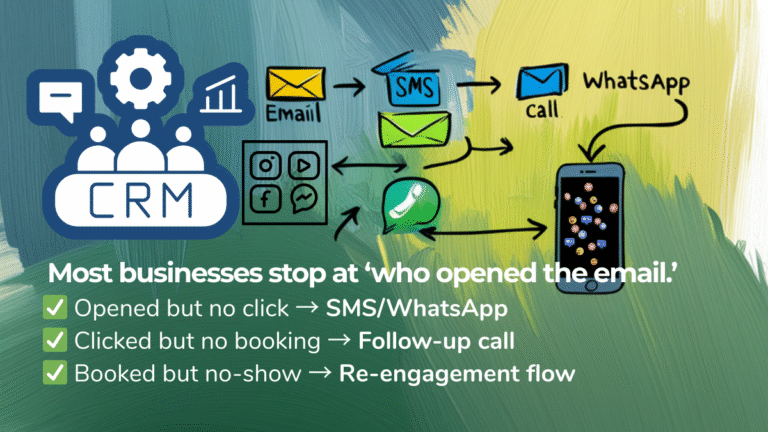
Automation Flow: Website form submission → Chatbot conversation → Data added to CRM → Lead scored based on responses → Assigned to appropriate email nurture sequence → Notification sent to you for high-value leads only
Step 2: Nurture with Personalized Content
Create email sequences that adapt based on recipient behavior. If someone clicks on a pricing link, they receive case studies. If they download a resource, they get related educational content. AI personalizes the journey while you set the strategic framework.
Automation Flow: Lead enters nurture sequence → AI tracks email opens/clicks → Adjusts next message based on engagement → Schedules follow-ups automatically → Escalates to sales when engagement threshold is met
Step 3: Monitor and Optimize Performance
AI dashboards aggregate data from all channels—website analytics, email metrics, social media engagement, ad performance—and identify trends automatically. You review weekly summaries instead of logging into ten different platforms.
Automation Flow: Data collected from all sources → AI generates performance reports → Compares against goals → Flags underperforming areas → Suggests optimization opportunities
Step 4: Scale Content Production
Use AI to generate blog outlines, social media post ideas, and email templates based on your top-performing content. You refine and approve, maintaining quality control while multiplying output.
Automation Flow: AI analyzes high-performing content → Suggests similar topics → Generates outlines/drafts → You edit and add expertise → Content published across channels automatically → Performance tracked for future optimization
Step 5: Automate Client Onboarding
When a lead converts to a customer, AI triggers a series of actions: welcome email sent, account created, onboarding materials delivered, first check-in scheduled, project management board set up. This ensures consistent experience while freeing you to focus on service delivery.
Automation Flow: Deal marked closed-won in CRM → Welcome sequence initiated → Documents sent for signature → Calendar invites created → Team notified → Client added to project management system
The beauty of this 360° system is its compounding effect. Each automated component feeds data to the others, creating a learning loop that improves over time with minimal ongoing intervention.
Actionable Steps for You
Ready to implement AI automation in your business? Follow this roadmap to start multiplying your efficiency immediately.
Step 1: Audit Your Time (This Week)
Track everything you do for three business days. Categorize tasks as either “strategic” (requires your unique expertise) or “operational” (could be done by someone/something else). Identify the top three time-consuming operational tasks—these are your automation targets.
Step 2: Choose One Workflow to Automate (Week 2)
Don’t try to automate everything at once. Pick the single most frustrating or time-consuming process from your audit. Start with something that has clear triggers and outcomes—like “when form is submitted, send welcome email and add to CRM.”
Recommended First Automations:
- Lead capture to CRM sync
- Appointment scheduling
- Follow-up email sequences
- Social media post scheduling
- Weekly report generation
Step 3: Set Up Your First Automation (Week 3)
Use Zapier’s free tier or n8n if you’re technical. Most common workflows have templates—you just need to connect your accounts and customize the details. Budget 2-4 hours for setup and testing.
Step 4: Measure and Refine (Ongoing)
After 30 days, calculate actual time saved. Did the automation work as expected? What broke or needed adjustment? Use this learning to tackle your next automation target.
Step 5: Build Your AI Decision Support System (Month 2-3)
Once operational tasks are automated, layer in AI tools for strategic decisions. Start using AI for content ideation, keyword research, or data analysis. The goal is spending less time gathering information and more time acting on insights.
Pro Tip: Join AI automation communities (Reddit’s r/n8n, Zapier’s community forums) where you can find pre-built workflows and get help troubleshooting. Don’t reinvent the wheel—adapt what others have proven works.
Conclusion: Your Competitive Advantage Starts Now
AI automation for business productivity isn’t a future trend—it’s a current necessity. Businesses that embrace AI as a multiplier will outpace competitors who rely solely on manual effort, not because their people are better, but because their people are amplified by technology.
The transformation doesn’t require massive investment or technical expertise. It starts with one automated workflow, one freed-up hour, one smarter decision made with AI-generated insights. Stack these small wins consistently, and you’ll build a 360° system that runs your operational engine while you drive strategic growth.
The question isn’t whether to adopt AI automation—it’s how quickly you can implement it before your competitors do.
Start small. Automate relentlessly. Multiply your impact.
Ready to dive deeper into AI automation strategies?
Subscribe to our YouTube channel for step-by-step tutorials on building automation workflows, or explore our blog for more guides on n8n, marketing automation, and AI-driven business growth.
Frequently Asked Questions (FAQs)
Unlock smarter workflows, higher efficiency, and measurable results with AI-driven marketing automation.