Can AI Really Automate Your Social Media? – Here’s What Actually Works in 2026
A practical guide to how to build a system to Automate Your Social Media for small businesses using AI, Google Sheets, automation tools, and human review.

A typical automated social media workflow uses AI to generate ideas and draft content, a central system such as Google Sheets to organize it, automation software such as n8n, Make, or Zapier to move information between tools, design software such as Canva or Adobe Express to create visuals, and a scheduling platform to publish approved content. Human review remains the final quality-control step.
You even had ideas. But the week got busy, clients needed attention, and suddenly your social media is a ghost town again.
That’s not a discipline problem. That’s a systems problem.
Running a small business means wearing a dozen hats at once. Marketing shouldn’t feel like a second full-time job — but for most founders and managers, it does. You’re writing captions, resizing images for three different platforms, trying to remember when you last posted, and wondering if any of it is even working.
Here’s the truth: doing all of this manually in 2026 isn’t just inefficient. It’s unsustainable.
The good news? You don’t have to keep grinding through it. There’s a smarter way — and it’s called an automated social media workflow.
Let’s break down exactly how it works.
How to Automate Your Social Media?
Think of it as your behind-the-scenes content machine.
An automated social media content workflow is a connected system of tools and processes that takes content from idea to published post — with you only stepping in where your judgment actually matters.
Here’s the simple version:
You’re not removing yourself from the process. You’re removing yourself from the repetitive, mechanical parts — so you can focus on strategy, relationships, and the things only you can do.
It’s not magic. It’s just smart systems thinking.
What Is an Automated Social Media Content Workflow?
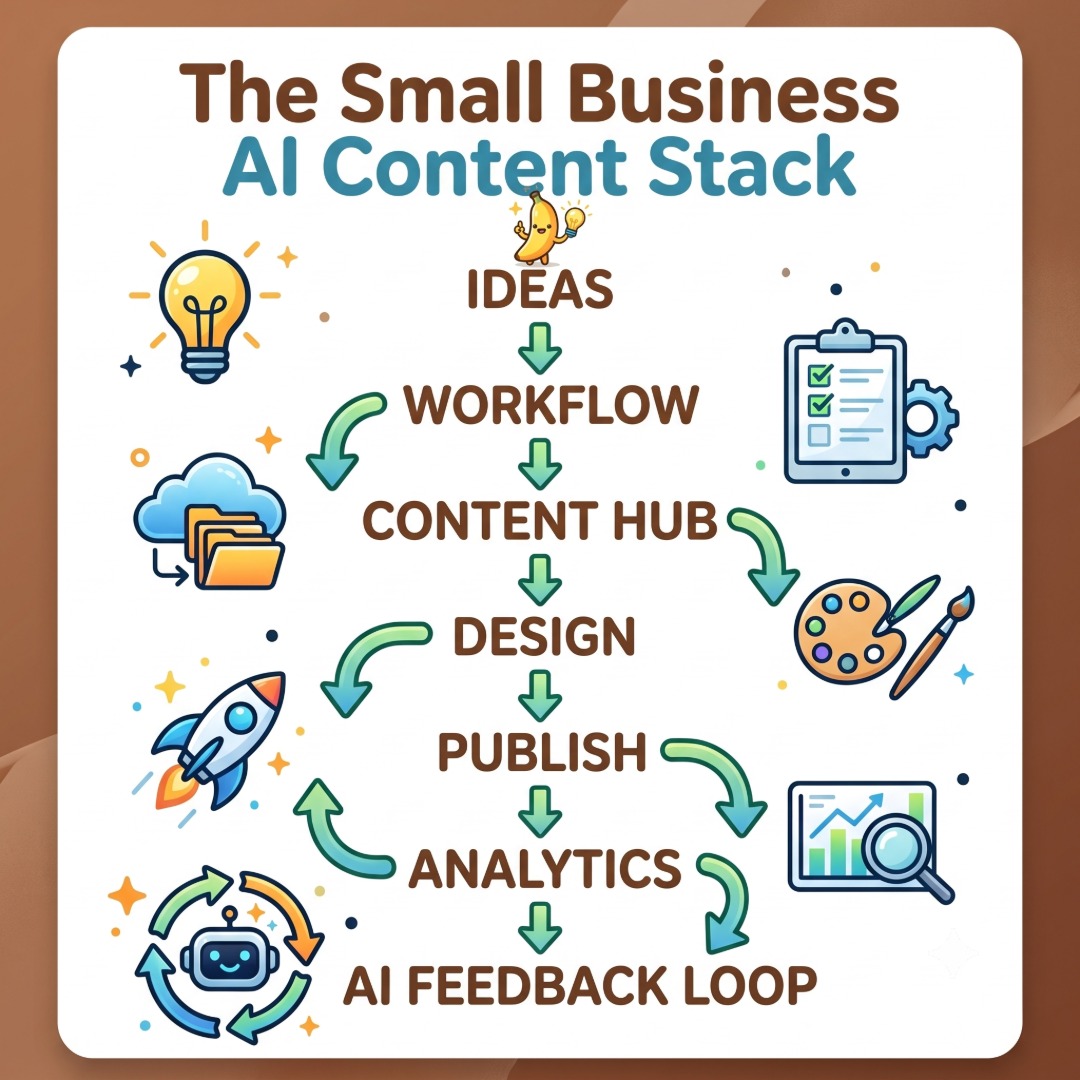
AI generates content ideas →
Automation stores and organizes them →
More AI refines and writes the copy →
Design tools create the visuals →
Scheduling tools publish at the right time →
Analytics bring data back to improve the next round.
Why Manual Social Media Management Doesn’t Scale
Let’s be direct: manually managing your social media in today’s environment is like trying to run a restaurant where one person cooks, serves, cleans, and does the accounting. Something always gets dropped.
Time is the first casualty. Some research and industry surveys put the weekly time commitment for small-business social media marketing at several hours per week, with some businesses reporting 6–10 hours or more. For a solopreneur or lean team, that’s hours pulled directly from revenue-generating work.
Inconsistency is the second problem. When you’re managing content by hand, posting schedules get erratic. You go two weeks strong, then disappear for a month. Audiences notice. Algorithms penalise it. Growth stalls.
The competitive pressure in 2026 is real. Your competitors — even smaller ones — are starting to automate. AI content tools have become affordable and accessible, which means businesses that don’t adopt smart automation will fall behind brands that produce more content, more consistently, with less effort.
And underneath all of this is something more human: burnout. When marketing feels like an exhausting chore rather than an exciting growth lever, quality drops, creativity dies, and you start dreading the whole thing.
The solution isn’t to hustle harder. It’s to build a system.
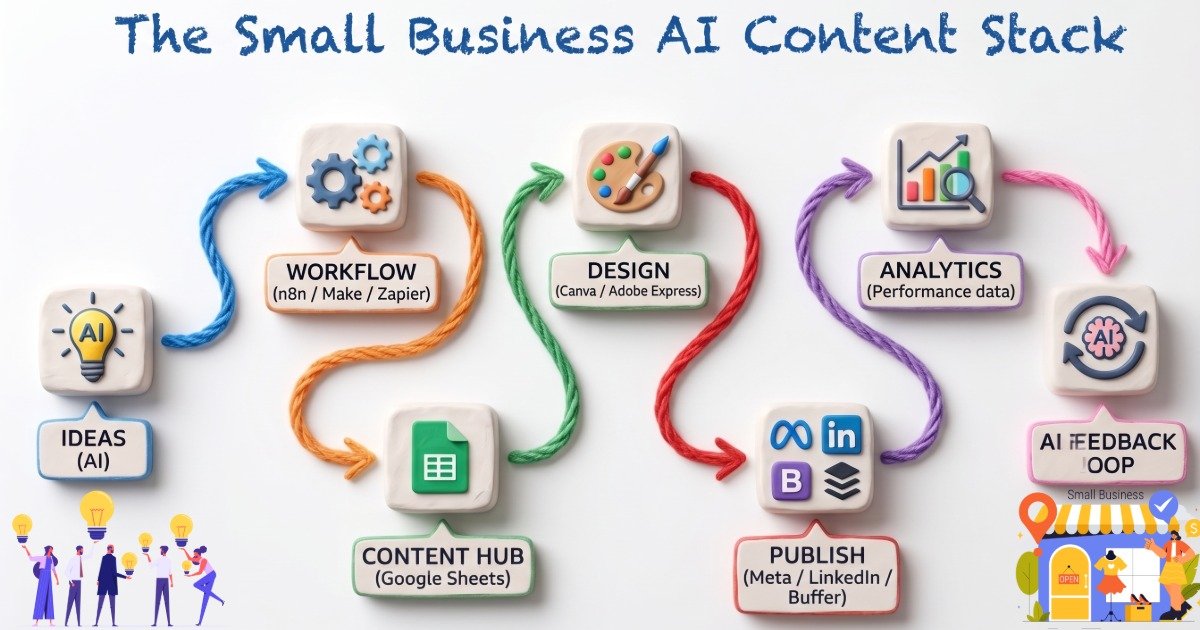
The Small Business AI Content Stack
You don’t need 15 different tools. You need the right ones, connected properly. Here’s what an effective automated content marketing system looks like in practice.
Automation Platforms: n8n, Zapier, and Make
These are the “pipes” that connect your tools together. Think of them as smart middlemen that trigger actions automatically when certain conditions are met.
n8n is the one we recommend most for small businesses serious about building scalable workflows. It’s self-hostable, extremely flexible, and far more cost-effective than alternatives at scale. If you want to automate blog and social media workflows with real depth, n8n is the tool to learn.
Make (formerly Integromat) is the visual choice, a strong visual option for businesses that prefer building workflows through a visual interface rather than code. If you’re a visual thinker, Make’s interface will click immediately.
Zapier is often the easiest starting point for straightforward workflows, although more complex systems can become expensive or difficult to manage as the number of automated steps grows.
All three can automate social media posting, trigger AI content generation, update spreadsheets, and connect to scheduling platforms. Your choice depends on budget, complexity, and how technical you’re willing to get.
AI Research and Content Tools
This is where the content actually gets created.
Using AI via API — whether that’s ChatGPT (OpenAI), Claude, or another model — you can automate idea generation, draft captions, write blog outlines, create email subject lines, and even validate whether a topic is trending before you invest time in it.
The key is to use AI as a draft engine, not a final authority. You give it context (your brand voice, your audience, your goals), it produces a starting point, and your automation pipeline moves that draft forward for review.
This is what turns a content automation pipeline from a novelty into a real business asset.
Design Tools: Canva and Adobe Express
Great copy still needs great visuals. For most small businesses,
Canva is the go-to. It’s accessible, template-rich, and has a built-in content scheduler. You can build branded templates once and reuse them infinitely — just swap the text and image.
Adobe Express (part of Adobe Creative Cloud) is worth considering if your team already lives in the Adobe ecosystem. It offers more design control and integrates well with other Creative Cloud apps. For businesses that need higher-quality branded content, Adobe Creative Cloud’s full suite offers advantages Canva simply can’t match.
Both platforms help you produce consistent, professional-looking visuals without needing a full-time designer.
Scheduling: Native & Third-Party Tools
Once content is created and approved, it needs to go out at the right time.
Meta Business Suite has a built-in scheduler for Facebook and Instagram — free and reliable. LinkedIn’s native scheduler handles LinkedIn posts natively without needing a third-party tool. For managing multiple platforms together, tools like Buffer, Later, or Publer offer clean dashboards and analytics.
The goal: content gets scheduled automatically based on your workflow, not because you remembered to log in.
A Step-by-Step Automated Social Media Workflow
Mini Workflow Diagram for small businesses:
Google Sheets → AI → Canva → Meta/LinkedIn scheduler
An Advanced Automation Stack:
n8n/Make → AI API → Google Sheets/Airtable → content review → design → scheduler → analytics → reporting
Step 1 — Idea Generation with AI
Your automation kicks off on a set schedule (say, every Monday morning). It sends a prompt to your AI tool asking for content ideas based on your niche, recent trends, and past top performers. You get 10 ideas without lifting a finger.
Step 2 — Store in Google Sheets
Those ideas populate automatically into a Google Sheet — your content calendar. Each row is a post, with columns for topic, caption draft, platform, visual direction, status, and publish date. This is your single source of truth.
Step 3 — Multi-AI Validation
A second automated step reviews each draft for tone, structure, brand alignment, potential issues, and obvious inconsistencies. Important factual claims should still be verified against reliable sources or reviewed by a human.
Step 4 — Final Content Output
After AI validation, the caption is polished and sitting in your Google Sheet marked “Ready for Review.” The hard work is done.
Step 5 — Creative Production
The automation prepares the approved content for a branded design template. Depending on the tools and integrations you’re using, this can range from generating a design brief and sending it to a human for production to automatically populating supported templates.
Step 6 — Scheduling and Publishing
The approved post — caption, hashtags, image — gets pushed to your scheduling tool automatically. It goes live at a scheduled time based on your content strategy and audience data. You didn’t have to log into Instagram at 10 PM to post something.
Step 7 — Analytics Feedback Loop
Weekly, your automation pulls engagement data from your platforms into your Google Sheet. Which posts got the most reach? The most clicks? This data feeds back into Step 1, making your next round of content smarter.
This is what it means to automate content creation with AI and Google Sheets — a living system that improves over time.
What Should You Automate — And What Should You Keep Human?
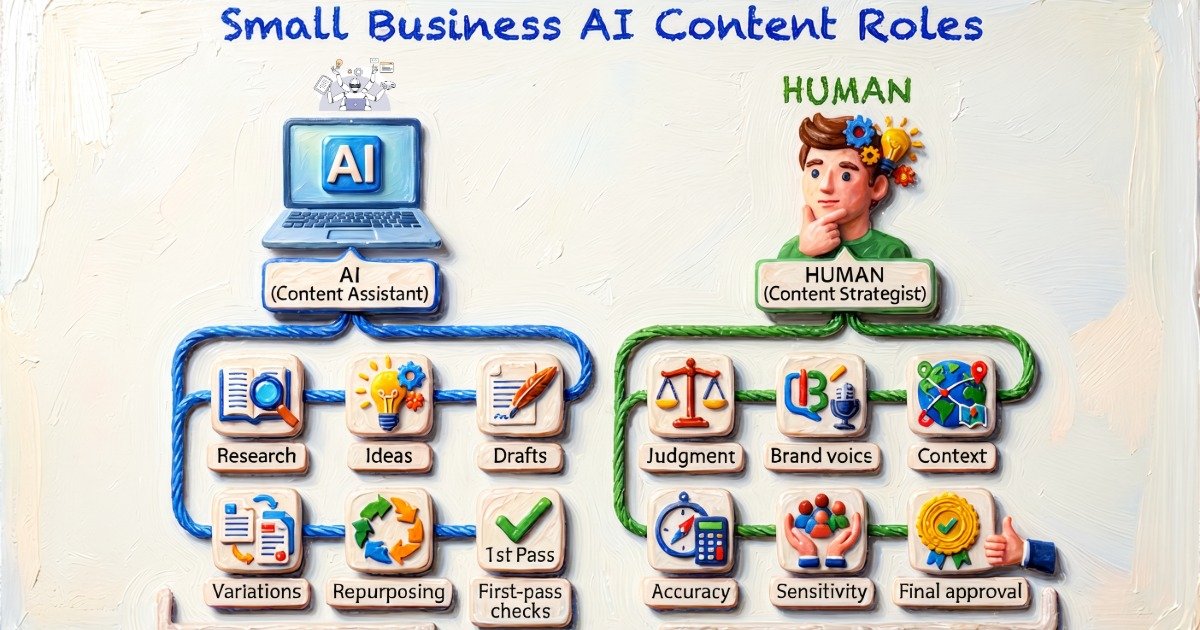
The goal isn’t to create a social media robot. It’s to automate the production line while keeping humans in control of the moments that require judgment.
Let’s be clear about something: automation doesn’t replace judgment. It replaces repetition.
AI makes mistakes. It misreads tone. It sometimes produces content that sounds technically correct but feels completely wrong for your brand. It doesn’t know that your audience had a bad week, or that a certain phrase is currently associated with something you don’t want to touch.
Think of it this way: AI is your first draft. You’re the editor. And a good editor makes everything better without having to write it from scratch.
That’s why every good AI content automation workflow needs a human checkpoint. Not to micromanage every word, but to be the final filter — the person who knows the brand, the audience, and the moment.
This also builds authority. When your content consistently sounds like you — not like a robot — people notice. They trust you more. And trust is still the most valuable thing in marketing.
What Can Social Media Automation Actually Save You?
When you build a proper automated marketing system for small businesses, here’s what changes:
- Scalability — Want to add a new platform? Expand to video content? Your system can grow with you.
- Lower costs — Compared to hiring a full-time social media manager, a well-built automation system costs a fraction of the price.
- Reduced stress — Possibly the most underrated benefit. When you know your content is handled, the Sunday-night panic disappears.
- Consistency — Your social channels stay active and on-brand, even during your busiest weeks. Consistency makes it easier to maintain visibility, stay recognisable to your audience, and build a reliable publishing habit. Audiences stay engaged.
- Better engagement — When you’re posting strategically (not randomly), content performs better. AI helps you test angles and formats that resonate.
- Time savings — Automating repetitive tasks can free up hours that would otherwise be spent researching topics, writing repetitive copy, formatting content, scheduling posts, and updating spreadsheets.
Pro Tips for Better Automation Results
- Start small. Don’t try to automate everything on day one. Pick one platform, one content type, and get that working smoothly. Then expand. Overcomplicating things early is how good ideas die.
- Measure what matters. Automation gives you more data than manual posting ever could. Use it. Set up weekly analytics reviews and look for patterns — what content format, what topic, what day of the week drives the best results.
- Build a feedback loop. Your automation system should get smarter over time, not stay static. Feed your best-performing content data back into your AI prompts. Let the system learn what your audience loves.
Common Automation Mistakes
- Over-automating. When everything is on autopilot with no human check, quality slips. You might post something tone-deaf during a sensitive news cycle, or run the same recycled content until your audience tunes out. Automation needs guardrails.
- Posting without strategy. Automation is a vehicle — it still needs a destination. Know your goals, your audience, and your brand voice before you start automating. Otherwise you’re just producing content faster with no purpose.
- Ignoring analytics. The data is there. Use it. Businesses that treat their analytics review as optional are leaving their best insights on the table.
- Tool overload. More tools doesn’t mean better results. Stick with the minimum stack that gets the job done. Complexity creates points of failure.
Where AI Marketing Automation Is Heading
- More AI-assisted research
- Better brand-context retention
- More automated content repurposing
- Better cross-platform adaptation
- Automated performance summaries
- More sophisticated workflow orchestration
- More human-in-the-loop approval systems
How Bluez Innovations Can Help
The strategy is straightforward. Building and maintaining the system consistently is where things can get complicated.
You need content ideas, branded visuals, captions, scheduling, platform management, performance tracking, and the automation connecting everything together. And even with the right tools, someone still needs to make sure the content actually sounds like your business.
That’s where we step in.
Instead of simply handing you another list of AI tools to figure out, we help turn the pieces into a working content system — combining AI-assisted creation, human review, branded design, social media scheduling, and automation around the way your business already operates.
For businesses that want to improve their online visibility without taking on another full-time marketing job, the Social Visibility Starter Pack provides a practical starting point. It combines professionally edited reels, custom social posts, AI-assisted content creation, automation setup, multi-platform publishing, and ongoing performance insights — while keeping you in control of what gets published.
Want to see what that looks like in practice?
👉 Explore the Social Visibility Starter Pack →
Conclusion
You don’t have to choose between running your business and having an active social media presence.
The right automated social media workflow means both can happen — simultaneously, consistently, and without stealing your sanity.
Start small. Pick one platform. Build one workflow. Get comfortable with it. Then expand.
The businesses winning at content marketing in 2026 aren’t the ones with the biggest teams or the biggest budgets. They’re the ones with the smartest systems. And building a smart system is entirely within your reach — especially with the right guidance.
Ready to Automate Your Marketing?
If you’re a small business owner tired of posting manually, scrambling for content ideas, and watching your social media go quiet for weeks at a time — let’s fix that.
Get in touch:
🌐 bluezinnovations.com
📧 sid@bluezinnovations.com
📍 Houston, Texas
You don’t have to figure this out alone. Reach out and let’s talk about what an automated content system could look like for your business.